Every guide to this topic gives you the same three steps: upload the file, click the button, read the summary. That part genuinely is easy, and you probably do not need an article to explain it.
The part nobody writes about is what happens next. In a 2025 evaluation from Northwestern University, researchers put the same questions to three artificial intelligence tools — ChatGPT, Gemini and NotebookLM — over a 300-document corpus, and checked every sentence of the output against the sources. Thirty percent of the responses contained at least one statement the documents did not support.
More interesting than the rate was the kind of error. Almost none of them were invented numbers or fabricated names — the failures people expect and watch for. They were quieter: a claim someone in the document had merely alleged came out as established fact, a hedged finding came out as a conclusion, and a neutral document acquired a purpose and an audience it never claimed.
So the useful version of this guide covers the three steps of uploading and then spends most of its time on the thing that determines whether the summary is worth anything: whether you can trust it.
This applies whether you use a dedicated summary generator, a free AI summarizer, or a general AI assistant. Automatic summarization is the same underlying task in all of them.
How to summarize a PDF using AI in three steps
The mechanics are the same across essentially every tool, ours included.
- 1
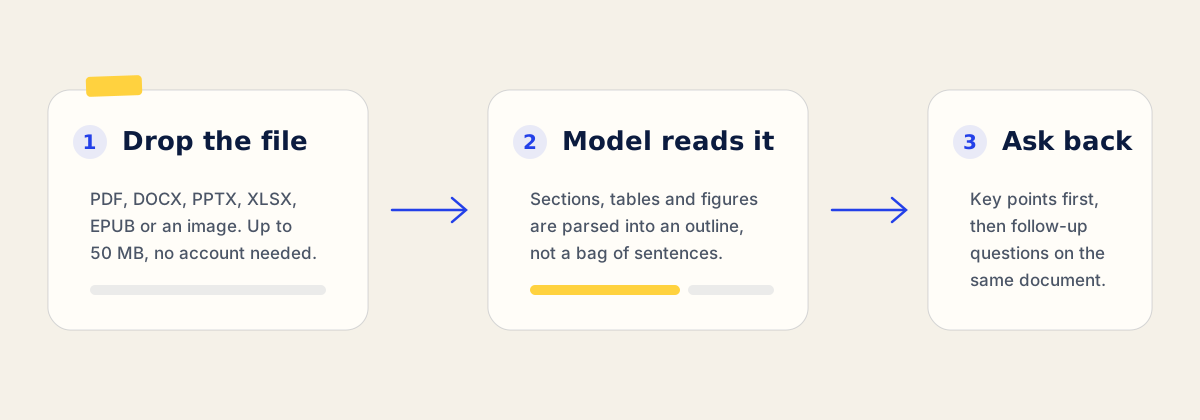
Upload your PDF, and use the original file
Drag the PDF document into the tool. Upload the file exported from the source application rather than a screenshot or a photo of a screen, because a native PDF keeps its text layer and nothing has to be guessed from pixels.
- 2
Let the AI analyze your document
The summarizing tool will extract key points and structure, then generate a summary in bullet points. On a typical report this takes seconds, and most tools can quickly summarize without you writing a prompt at all.
- 3
Ask specific questions afterwards
This is the step most people skip and the one that pays. The first concise summary is generic by design. The answer you actually needed usually arrives in the second exchange, once you ask specific questions about the part that matters.
That is the whole procedure. Everything below is about making the output trustworthy.
Start with the question, not the document
A summary is only useful relative to a purpose. “Summarize this contract” produces a neutral précis that reads well and helps nobody. “What are the termination conditions and who pays in each case?” produces something you can act on.
Before uploading anything, write down the one or two things you actually need. You will use them twice: once to judge whether the summary is useful, and again as the first follow-up question.
If you cannot say what decision the document is supposed to inform, you are not ready to summarize it — you are procrastinating with extra steps.
What happens after you upload a PDF file
To extract PDF content at all, a tool has to solve a problem that is easy to underestimate. A PDF is not a text file. It is a page-description format, which means it records where marks appear on a page rather than what the document means. There is no reliable notion of “this is a heading” or “this cell belongs to that column” baked in. All of that has to be reconstructed.
This is why two AI tools given the same PDF file can return noticeably different concise summaries. A tool that flattens the entire PDF into one long string will produce a fluent summary of scrambled input. Financial statements are mostly tables. Slide decks are mostly fragments. Academic papers have two columns, footnotes and captions that interleave badly when read naively.
The practical implication: if a summary seems oddly generic or subtly wrong, the problem is often extraction rather than the model. There is a quick way to tell, covered further down.
Summarize PDFs using AI: what the tool is doing under the hood
Broadly there are two architectures, and the difference matters more than any feature list.
Everything in context. The document text is placed directly into the AI model’s context window, and the model answers from it. This is what happens when you attach a PDF to a general AI assistant such as ChatGPT. It works well on short documents and degrades on long ones, because material can be truncated or simply lost in the middle of a very long context.
Retrieval with citations. The system splits the document into passages and indexes them. To answer, it uses AI to analyze the retrieved passages rather than the whole file, and points back to the source location for each claim. This is the design behind tools like NotebookLM, and it is what makes claims checkable.
Both approaches summarize fluently, and both are built on the same underlying AI models. They differ in how often they say things the document does not contain. No tool can summarize PDFs instantly and accurately without one of these two mechanisms doing the work of pulling the right text out first.
Why AI summarization fails, and what that looks like
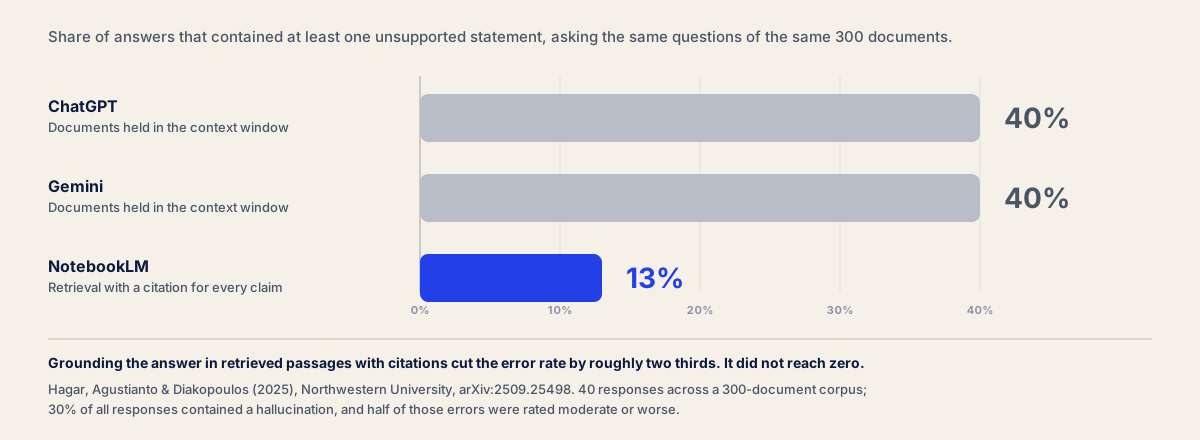
The Northwestern team, Hagar, Agustianto and Diakopoulos, annotated 40 responses sentence by sentence. ChatGPT and Gemini each produced an unsupported statement in 40% of responses. NotebookLM, which retrieves passages and cites them, came in at 13%.
Three details from that study are worth carrying with you.
Errors cluster. When a response contained one unsupported claim it usually contained several — an average of four for Gemini, three for NotebookLM. A summary is rarely slightly wrong. It is either clean or it has a problem running through it.
Half were rated moderate or worse. Fourteen percent were classed as alarming, including a case where a model framed a policy as retaliation for something entirely absent from the cited document.
The architecture helped but did not solve it. Even the citation-grounded tool was wrong in one response out of eight. There is no setting that removes the need to check.
Attribution drift: how a summary changes what the document meant
This is the finding that should change how you read any AI summary.
The researchers expected fabrication — invented entities, wrong figures, garbled dates. What they mostly found instead was interpretive overconfidence: models added confident analysis the sources did not support, characterised documents without evidence, and turned attributed opinions into declarative statements.
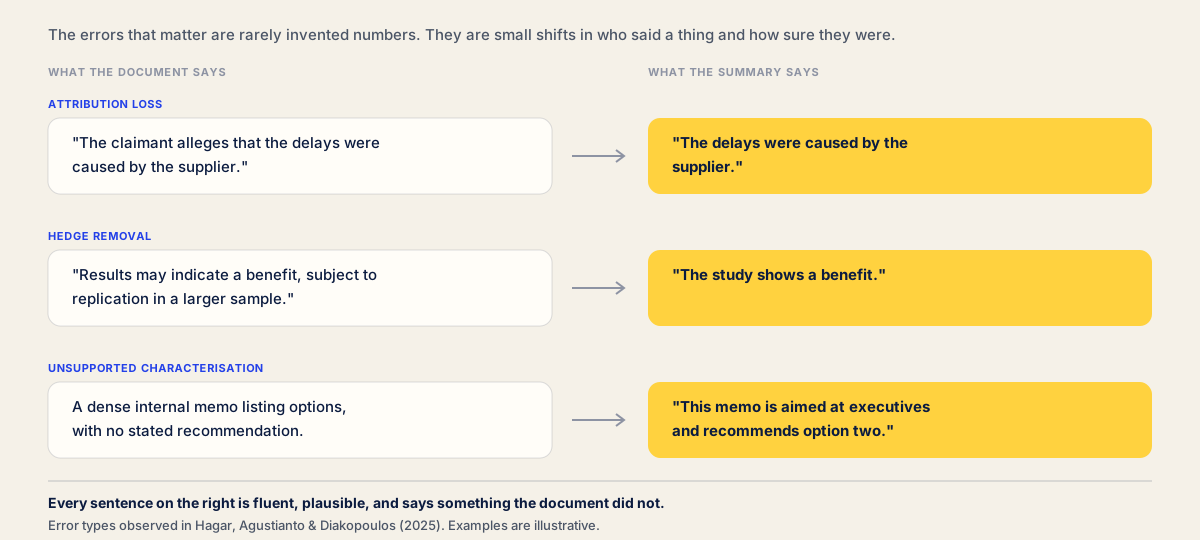
Compression does this almost mechanically. “The claimant alleges that the delays were caused by the supplier” is long, and “the supplier caused the delays” is short and reads better. Shortening is the whole job you asked for, and attribution is the cheapest thing to drop.
The same pressure removes hedges. Words like may, unless, approximately, subject to and pending are exactly the words a summarizer treats as noise, and exactly the words that carry the risk in a contract, a study or a medical guideline.
Ask yourself: does the summary state as fact something the document only says someone claims? That single check catches the most common serious error in AI summarization, and no tool will flag it for you.
How to check an AI summary, fast and easy
You do not need to re-read the document. You need to check the three or four claims that would change what you do. It takes about a minute.
- 1
Search the source for every number and date
Open the PDF and use find. Numbers are the easiest errors to catch and the most expensive to miss. If a figure in the summary does not appear in the file, nothing below it is trustworthy either.
- 2
Check who is speaking
For each load-bearing claim, find it in the document and confirm whether it is the author's conclusion, a quoted party's assertion, or a hypothesis being discussed. This is where attribution drift lives.
- 3
Look for the missing hedges
Take the strongest sentence in the summary and find the corresponding passage. If the original contains may, might, subject to, or unless, and the summary does not, the meaning has changed.
- 4
Ask what the document does not say
Put it to the tool directly: 'What does this document not tell me about X?' A well-grounded answer will admit the gap. An answer that invents coverage tells you to distrust the rest.
- 5
Spot-check extraction with a known passage
Ask it to quote a specific paragraph you have already read. If the quote comes back mangled or wrong, the text was extracted badly and the summary is describing garbage.
~1 min
to verify the three or four claims that actually matter
2nd turn
where the useful detail usually appears
0
summaries worth citing without opening the source once
How to summarize a lengthy PDF without losing the middle
Long PDFs introduce a failure that short ones do not: material silently going missing. Knowing how to summarize long PDF files really means knowing how to tell when the tool skipped part of one. A 400-page manual can exceed what a chatbot holds at once, and the usual symptom is not an error message. It is a confident summary of the first and last sections.
A few things help.
Prefer an AI-powered PDF summarizer that reads the document page by page and builds a structured outline, rather than one that depends on fitting everything into a single context window. If you are using a general chatbot, split the file by chapter, summarize chapters separately, then combine the results.
Run enumeration questions in passes. Asking “list every clause mentioning indemnification” across a 200-page contract depends on retrieval finding every instance, and it often finds most. Ask section by section, then cross-check the count against your PDF reader’s own search.
Finally, test the middle deliberately. Ask about something you know appears around the halfway mark. If the tool cannot find it, it never read it.
Scanned PDFs, tables, and files the AI cannot read
Some documents fail before summarization even begins. These are the usual culprits.
- Scanned or image-based PDFs. An image-based PDF has no text layer, so it needs optical character recognition first. Clean scans convert well; faint photocopies, unusual fonts and handwriting do not, so verify numbers with extra care on anything scanned.
- Password-protected files. Encrypted or copy-protected PDFs cannot be read at all. Remove the protection first.
- Complex tables. Multi-row, multi-column tables are the most common silent failure in the whole category. They frequently extract as a jumble, and the model then summarizes the jumble fluently. If your document’s meaning lives in a table, check the table by hand.
- Mathematical notation. Equations often survive poorly, whether rendered or scanned.
- Right-to-left scripts. Extraction quality for Arabic and Hebrew varies; confirm before relying on the result.
Choosing an AI PDF summarizer or a general AI summarizer
For a one-off short document, a general chatbot is fine. Adobe Acrobat has a built-in AI summary feature if you already pay Adobe Inc. for it, and there are dozens of standalone web tools. For anything you do regularly, a purpose-built AI-powered summarizer has three concrete advantages: it handles the file formats you actually have, it can summarize any PDF of realistic length without you splitting it, and it does not require you to craft a prompt each time.
What to look at when comparing:
- Does it read the entire document, or fit what it can into a context window?
- Can you ask follow-up questions and extract key insights on demand, or only get one static summary of your document?
- Does it handle your formats — Word, Microsoft PowerPoint, e-books, images — or only PDF?
- What is the file size ceiling?
- Does it work in the language of your documents, and can it handle translation into the language you need?
- What happens to your file afterwards?
Summarize a PDF with PDFsummarizer.net
We build one of these tools, so read this section as an interested party describing its own product rather than a neutral ranking. It is here because the checklist above is the checklist we built against, and you can judge the answers yourself.
It reads the entire PDF, page by page. The file is processed in sequence and assembled into a structured outline, rather than being poured into a context window and truncated when it does not fit. That is the difference between a 300-page document being summarized and its middle quietly disappearing.
Fourteen formats, up to 50 MB. PDF, Word and Microsoft PowerPoint, plain text and Markdown, HTML, images, and e-book formats including EPUB, FB2 and MOBI. You upload your file and the same pipeline handles all of them.
Any document language, any output language. Summarize a German contract into English, or an English paper into Ukrainian. Translation happens as part of the summary rather than as a separate step.
Follow-up questions are the point. The first summary is generic by design, in our tool as in every other one. You can ask specific questions about any part of the document afterwards, choose the length and the focus, then copy or download the result.
Free, with no account. No registration, no subscription, and no cap on how many documents you run. There are also focused versions for books, plain text, images and slide decks.
And the honest limitation: like most summarizers, it does not attach a source citation to every individual sentence the way a retrieval-and-citation system does. So the one-minute check earlier in this article applies to our output exactly as much as to anyone else’s. A summarizer that told you its summaries needed no checking would be telling you something the research does not support.
How to read a PDF with AI without outsourcing your judgement
The most useful mental model is this: treat the summary as a first pass by a fast, literal-minded assistant who has read the whole thing, has no context about why it matters, and will never tell you when they are unsure.
That assistant is extremely good at one job — telling you where to look. They are unreliable at the job people actually delegate, which is deciding what the document means.
In practice this means reading the summary for navigation rather than for conclusions. Which sections matter? Where is the number I need? Which three pages should I actually read? Answering those questions well is worth a lot of time, and it does not require the summary to be perfect.
Turn your PDF summaries into study guides
If you are a student, PDF summaries are most valuable at the start of studying, not the end. Upload PDFs at the point where you are still working out what a topic contains, not the night before the exam.
A summary of a chapter tells you what the chapter is about and which parts are dense. That is a map. It is not learning, and reading a summary will not put anything in your memory — the research on that is fairly clear, and we cover it in our guide to evidence-backed study methods. Nor does it help to request the summary in the format you believe suits you; the evidence on learning styles does not support that either.
The workflow that does work is to use the summary to orient yourself, then immediately convert it into questions you have to answer from memory. Ask the tool to generate questions rather than answers, close the document, and write out what you know. That turns a passive artifact into retrieval practice, which is the part with real evidence behind it. The blurting method is the simplest version of this.
The same applies to flashcards. A tool like Knowt will turn a chapter into a deck automatically, and a generated deck is genuinely useful — but only once you are testing yourself against it. Making the cards is not the studying. We compare the options in our roundup of AI study tools.
How to summarize your PDFs for work, research and study
The right approach shifts with the document type.
Reports and internal documents. Ask for decisions and numbers, not themes. “What is being recommended, by whom, and what would it cost?” beats “summarize this.” The goal is to understand the content well enough to act, not to generate a summary you file away.
Research papers. Screening is the strong use case. Summaries are reliable enough to tell you whether a paper is relevant, and not reliable enough to cite. Once a paper matters, read the methods yourself — that is where the caveats live, and caveats are exactly what compression removes.
Contracts and legal documents. Use the summary only to decide which clauses to read closely. Never as the basis for signing. The wording is the product in a contract, and a summary is by definition not the wording.
Textbooks and study material. Orientation first, then retrieval practice, as above.
When to use AI and when to read PDFs yourself
Some documents deserve to be read. Anything you will sign, anything where the exact wording is the product — legal language, technical specifications, medical guidance, regulatory filings — should be summarized only to decide which parts to read closely.
The honest test is to ask what happens if the summary is subtly wrong. If the answer is “I waste ten minutes,” summarize freely. If the answer involves money, a deadline, a diagnosis or a signature, the summary is an index and nothing more.
Frequently asked questions
How do I summarize a PDF using AI?
Upload and summarize your PDF with an AI summarizer: let it extract the text and structure, and read the concise summary and key insights it generates. Then ask one narrowing follow-up question about the specific thing you needed, because the first summary is generic by design. Finally, verify any number, date or conditional claim that would change your decision by searching for it in the original file.
How accurate are AI PDF summaries?
Good enough to navigate a document, not good enough to act on unchecked. In a 2025 Northwestern University evaluation, 30% of AI responses over a document corpus contained at least one unsupported statement, with 40% for ChatGPT and Gemini and 13% for NotebookLM, which cites its sources. Most errors were not invented facts but shifts in meaning, such as presenting an alleged claim as established.
Can AI summarize scanned PDFs?
Yes, if the tool runs optical character recognition first, because a scanned PDF is an image with no text layer. Quality depends heavily on the scan. Clean, high-resolution scans convert reliably; faded photocopies, unusual fonts and handwriting produce recognition errors, so check numbers carefully on anything scanned.
How long a PDF can AI summarize?
It depends on the architecture. Tools that read a document page by page and build a structured outline handle long files without you splitting them. General chatbots load text into a context window and can silently truncate very long documents, so the summary covers the beginning and end while missing the middle. Test by asking about something you know appears halfway through.
Is it better to use a PDF summarizer or ChatGPT?
For a single short document, a general chatbot is fine. A purpose-built AI PDF summarizer is better when you do this often: it supports more file formats, reads long documents without manual splitting, requires no prompt, and returns a consistently structured summary. Tools that cite the passage behind each claim also make verification much faster.
Why does my AI summary miss information from tables?
Because a PDF stores the position of marks on a page rather than the logical structure of a table. Multi-row, multi-column tables often extract as scrambled text, and the model then summarizes the scrambled version fluently, with no indication anything went wrong. If the meaning of your document lives in a table, read the table yourself.
Is it safe to upload confidential documents to an AI summarizer?
That depends entirely on the provider, and it is worth checking rather than assuming. Look for what happens to the file after processing, whether it is retained, and whether it may be used for model training. For genuinely sensitive material — client data, unpublished research, anything under a confidentiality obligation — check your organisation's policy before uploading, regardless of what the tool promises.
The short version
Uploading a PDF and getting a summary is easy, and it is not the skill. The skill is knowing that summaries fail in a specific, predictable direction: they are fluent, they are confident, and they quietly upgrade hedged or attributed claims into plain facts.
Decide what you need before you upload. Read the concise PDF summary as a map rather than a verdict. Spend the one minute it takes to check the handful of claims that matter.
Do that, and an AI summarizer will reliably save you hours. Skip it, and it will eventually cost you more than it saved.