“What is the best AI tool for finance reports?” sounds like one question, but it hides two very different jobs. One is reading financial reports: getting through a 10-K, an annual report or a broker note fast enough to understand the numbers and the story behind them. The other is producing financial reporting: closing the books, reconciling accounts, building forecasts and filing documents that auditors will check.
The AI tools for each job are almost entirely different. A general AI assistant is excellent at the first and risky at the second. An FP&A platform is built for the second and of little use for the first. This guide compares 10 AI tools across both, explains where AI still gets financial numbers wrong, and shows how to read a 10-K with AI in about 15 minutes.
We make PDFSummarizer.net, which appears in this list for one narrow use case: summarizing long financial PDFs. We have no affiliate relationship with any other tool listed. Descriptions are based on each vendor’s public documentation as of September 2026; features and plans change often. This article is general information, not investment, accounting or legal advice.
Best AI tool for finance reports: the quick answer
| If you need to… | Best fit | Why |
|---|---|---|
| Understand a long annual report or 10-K fast | ChatGPT, Claude, PDFSummarizer.net | Summaries and questions over a PDF |
| Ask questions across several filings, with citations | NotebookLM, Claude | Answers grounded in your uploaded sources |
| Research companies and markets as an analyst | AlphaSense, Fiscal.ai | Filings, transcripts and financial data in one place |
| Get historical financials into an Excel model | Daloopa | Data points hyperlinked to the source filing |
| Analyze or build a model in a spreadsheet | Copilot in Excel, Claude for Excel | AI inside the workbook |
| Match audit samples to invoices and statements | DataSnipper | Document matching inside Excel |
| Automate budgeting, forecasting and variance analysis | Datarails, Drivetrain | FP&A platforms with AI on governed data |
| Tie out and file SEC or regulatory reports | Workiva | Reporting platform with AI agents and audit trail |
Two jobs for finance teams: reading financial reports vs producing financial reporting
Reading and analysis covers what investors, analysts, students, journalists and managers do with reports other people produced: an annual report, a 10-K or 10-Q, an earnings call transcript, a credit memo. The goal is understanding — what the company earns, what changed, what the risks are. Mistakes are costly but usually caught before anyone acts on them.
Producing reporting covers what corporate finance teams do: the financial close, reconciliations, management reports, budgets and forecasts, and regulatory filings. Here the output is relied on by others, audited, and in listed companies subject to internal controls under the Sarbanes–Oxley Act. AI in financial reporting has to be traceable, reviewable and permission-controlled.
That difference decides which AI tool is the right AI for you. Using tools like ChatGPT to understand a report is a sensible use case. Pasting a generated number into a filing is not.
How we chose these tools
We looked for AI tools with a clear use case in finance, current product documentation and a way to verify their output against sources. We included general-purpose AI because that is what most finance professionals already use, and specialist tools where they add something general AI cannot: licensed financial data, source links, Excel integration or audit trails. We did not run paid enterprise trials of every platform, so we describe what each tool is designed to do rather than scoring them.
The 10 best AI tools for financial analysis and reporting
1. ChatGPT — best general AI assistant for reading reports
Best for: summarizing reports, explaining terms, quick data analysis on exported financial data.
ChatGPT can read uploaded PDFs and spreadsheets, answer questions about them, and run code to analyze data, calculate ratios and draw charts. For reading a financial statement or asking “why did gross margin fall?”, it is fast and flexible. Business and Enterprise plans add admin controls and exclude your data from training by default.
Limits: it can misread tables in scanned PDFs, mix up periods and state a wrong figure confidently. Ask it to quote the page for every number and check it.
2. Claude — best for long documents and Excel models
Best for: long annual reports, comparing several documents, reasoning through complex financial disclosures.
Claude handles long documents well and is good at following an argument across a 200-page filing. Claude for Excel, available on paid plans (Pro, Max, Team and Enterprise), works in a sidebar inside the workbook: it can explain formulas, trace references, update assumptions and help build models directly in Excel, rather than through copy-and-paste.
Limits: like any large language model, it can produce plausible but wrong numbers. Treat formula changes like a colleague’s edits and review them.
3. Microsoft Copilot in Excel — best for finance teams on Microsoft 365
Best for: finance teams already working in Excel who want AI help with formulas, analysis and charts.
Copilot in Excel can write formulas, analyze data, summarize a table, build charts and, in newer agent features, plan and carry out multi-step edits to a workbook. Because it lives inside Microsoft 365, it follows your organization’s existing permissions and data protections. Features depend on your Microsoft 365 license and are expanding quickly.
Limits: it works best on clean, structured tables. Messy exports need tidying first, and every generated formula should be spot-checked.
4. NotebookLM — best for questions across several filings
Best for: building a research notebook from several reports and asking questions with citations.
Google’s NotebookLM answers only from the sources you upload — for example, three years of annual reports and the latest earnings call transcript — and links each answer to the passage it came from. That makes it one of the easiest AI tools for checking where a claim comes from.
Limits: it does not pull live market data, and complex tables in PDFs can still be misread. It is a reading tool, not a modeling tool.
5. PDFSummarizer.net — best for a quick overview of a long financial PDF
Best for: getting the main points of a long report before you read it.
Our free AI PDF summarizer turns a long PDF — an annual report, a prospectus, an industry report — into a structured summary in under a minute, without an account. It is useful for triage: deciding which of ten reports deserves a close reading, or getting the structure of a 10-K before you open it.
Limits: it is not a financial analysis tool. It does not build models, compare peers or pull market data, and a summary is not a substitute for the financial statements. See our guide on how to summarize a PDF for how to check a summary against the source.
6. AlphaSense — best for professional market and company research
Best for: equity analysts, corporate development and strategy teams.
AlphaSense is a market intelligence platform that searches company filings, earnings call transcripts, broker research and expert call transcripts. Its generative AI features summarize and answer questions across that content with citations back to the source documents. It is widely used by investment banking, asset management and corporate strategy teams.
Limits: enterprise pricing puts it out of reach for individuals, and its value depends on the content your subscription includes.
7. Fiscal.ai — best for individual investors and analysts
Best for: fundamental research on public companies without an institutional budget.
Fiscal.ai, formerly FinChat, combines financial data, company-reported segment and KPI data, screeners and an AI assistant that answers questions about companies with sourced figures. It also offers API and MCP access, so its data can be used inside tools like Claude or ChatGPT.
Limits: coverage is strongest for larger listed companies, and it is a research tool, not investment advice.
8. Daloopa — best for historical financial data in Excel models
Best for: buy-side and sell-side analysts who maintain Excel models.
Daloopa extracts historical financial data from filings, press releases and investor presentations for thousands of public companies, and hyperlinks every data point to its source document. An Excel add-in updates models in one click, and an MCP connector lets AI assistants use the same verified data instead of guessing.
Limits: it is an institutional data product. It supplies numbers; the analysis is still yours.
9. DataSnipper — best for audit and financial controls
Best for: internal and external auditors and financial control teams.
DataSnipper is an Excel add-in built for audit. Its Document Matching feature automatically matches Excel sample data to supporting evidence such as invoices, contracts and bank statements, and records each match as a traceable link — the kind of evidence trail reviewers and auditors need.
Limits: it is designed for testing and reconciliation, not for analysis or report writing, and it runs inside desktop Excel.
10. Workiva — best for regulatory and SEC reporting
Best for: finance and reporting teams at listed companies preparing 10-Ks, 10-Qs and other filings.
Workiva is a reporting platform used to prepare, tag and file regulatory reports. In July 2026 it launched AI agents for its advanced tiers, including a Tie-Out Agent that checks figures across a report and flags discrepancies, and a Benchmarking Agent that compares disclosures with peers’ SEC filings, with each insight traceable to the source.
Limits: it is an enterprise platform with enterprise implementation. The AI helps review and draft within a governed workflow; people still own the numbers.
Also consider for FP&A: Datarails and Drivetrain
If your problem is budgeting, forecasting, the financial plan and management reporting rather than reading reports, look at FP&A platforms, which focus on analysis and automation of routine finance work. Datarails keeps finance teams in Excel while consolidating data from accounting software and other systems, and its Genius AI assistant answers questions and generates narratives and visuals from that governed data. Drivetrain builds models and reports from your ERP data and can run variance analysis and scenario analysis with AI; its AI writes the logic, but every number is calculated by a deterministic engine rather than generated by a language model.
Best AI tools for financial analysis compared
| Tool | Main job | Works in | Best for |
|---|---|---|---|
| ChatGPT | Reading, analysis | Web, desktop | Anyone reading reports |
| Claude | Reading, Excel models | Web, Excel | Long filings, model work |
| Copilot in Excel | Spreadsheet analysis | Excel (Microsoft 365) | Corporate finance teams |
| NotebookLM | Q&A across sources | Web | Multi-document research |
| PDFSummarizer.net | PDF summaries | Web | Quick triage of reports |
| AlphaSense | Market research | Web | Professional analysts |
| Fiscal.ai | Company research | Web, API | Individual investors |
| Daloopa | Financial data | Excel, API | Model-heavy analysts |
| DataSnipper | Audit matching | Excel | Auditors, controllers |
| Workiva | Regulatory reporting | Web platform | SEC reporting teams |
Is there a ChatGPT for finance?
Not one tool, but a category. AI in finance has moved from standalone chatbots to AI built into the tools finance teams already use: Gemini works inside Google Workspace apps like Google Sheets and Google Docs, and Copilot inside Microsoft 365. General AI assistants (ChatGPT, Claude, Gemini, Copilot) are increasingly connected to financial data through integrations: Daloopa, Fiscal.ai, Drivetrain and Workiva all offer connectors so an AI assistant can work with verified numbers instead of guessing. That is the direction finance AI is moving — agentic AI that reasons in a general model but pulls numbers from a trusted system.
For most finance professionals, the practical answer in 2026 is a general AI assistant for reading, drafting and data analysis, plus one specialist tool for the data or workflow that matters most in their job.
How to read a 10-K with AI in 15 minutes
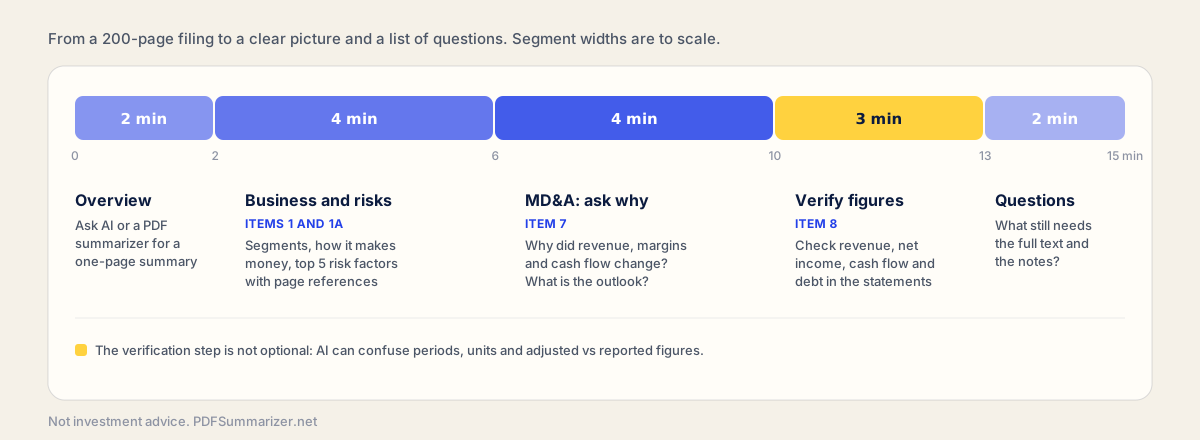
A 10-K can run to hundreds of pages. You do not need to read all of it to understand the company, and AI can help you find the parts that matter. Here is a workflow that works with any of the reading tools above.
- 1
Get the overview (2 minutes)
Upload the 10-K to an AI tool or a PDF summarizer and ask for a one-page summary: what the company does, how it makes money, and the main changes this year.
- 2
Business and risk factors (4 minutes)
Ask for the business segments and the five most important risk factors, with page references. Item 1 (Business) and Item 1A (Risk Factors) are where these live.
- 3
MD&A: ask why (4 minutes)
Management's Discussion and Analysis (Item 7) explains the numbers. Ask why revenue, margins and cash flow changed, and what management says about next year.
- 4
Verify the key figures (3 minutes)
Open the financial statements (Item 8) and check revenue, net income, operating cash flow and debt against what the AI told you. This step is not optional.
- 5
Write your open questions (2 minutes)
List what you still do not understand: an accounting change, a one-off item, a segment that moved unexpectedly. These are where to read the full text and the notes.
Fifteen minutes will not make you an expert on the company, but it gets you from a 200-page PDF to a clear picture and a short list of questions — a far better starting point than the first page.
Where AI in financial analysis gets numbers wrong
In the FinanceBench study, published in 2023 by researchers at Patronus AI, GPT-4 Turbo with a retrieval system gave a wrong answer or refused to answer 81% of a sample of questions about public company filings. Given the exact pages containing the evidence, the same model answered 85% correctly. Models have improved since, but the lesson holds: AI does much better when it is pointed at the right part of the document, and it still makes mistakes when it has to find the numbers itself.
The errors follow patterns. Check for these before you rely on any AI output:
- Wrong period. Quarterly vs annual, fiscal year vs calendar year, current vs prior year column.
- Wrong units. Thousands vs millions, and currency for companies reporting outside dollars.
- Adjusted vs reported figures. Non-GAAP “adjusted EBITDA” presented as if it were a GAAP number.
- Segment vs consolidated. A segment’s revenue quoted as the company’s.
- Misread tables. Merged cells, footnote markers and scanned PDFs cause misaligned rows.
- Invented calculations. Ratios and growth rates computed wrongly, or a number that is not in the report at all.
The simplest defense is to ask the AI to cite the page and table for every number, then check the figures that matter yourself. For more on AI accuracy in research, see our guide to the best AI for research.
Do not put an AI-generated figure into a report, model, filing or investment decision without tracing it to the source. For anything with legal, tax or investment consequences, consult a qualified professional.
Security and compliance
Financial data is often confidential, and some of it is material non-public information. Before you use AI for finance tasks at work:
- Check your company’s AI policy. Many finance leaders restrict which AI platforms can receive company data.
- Use business or enterprise plans for confidential data. They typically exclude your data from model training and add admin controls; consumer plans may not.
- Keep non-public information out of consumer tools. Unreleased results, deal documents and client data belong only in approved systems.
- Prefer tools with audit trails for anything that feeds financial reporting. Internal controls under the Sarbanes–Oxley Act apply to how numbers are produced, including with AI.
Public filings like a 10-K are, by definition, public. Reading them with any AI tool carries little data risk; the risk is in trusting the output.
Choosing the right AI tool for finance: best practices
Start with the job, not the tool:
- Reading reports? Start with a general AI assistant you already have, and add a PDF summarizer for triage.
- Research across many companies? Look at AlphaSense or Fiscal.ai, depending on budget.
- Building models in Excel? Try Copilot in Excel or Claude for Excel, and Daloopa for data.
- Audit or controls work? DataSnipper is built for it.
- Budgeting, forecasting and management reporting? Evaluate FP&A platforms like Datarails and Drivetrain.
- Regulatory filings? Workiva is designed for SEC and regulatory reporting workflows.
Even the best tool fails if the data behind it is messy, so clean inputs and clear ownership matter as much as the choice of software. Whichever you choose, the best practices are the same: keep a human reviewer, verify numbers against sources, and use AI to move faster on the work — not to skip the checking.
Frequently asked questions
What is the best AI tool for financial reporting?
It depends on the job. For producing regulatory reports, Workiva is built for SEC and regulatory reporting. For management reporting, budgeting and forecasting, FP&A platforms like Datarails and Drivetrain fit best. For reading and analyzing reports, general AI like ChatGPT, Claude and NotebookLM works well, with every number verified against the source.
What are the best AI tools for finance professionals?
Most finance professionals combine a general AI assistant (ChatGPT, Claude or Copilot in Excel) with one specialist tool: AlphaSense or Fiscal.ai for research, Daloopa for model data, DataSnipper for audit, or an FP&A platform for planning. The right mix depends on whether you mainly read reports or produce them.
Can AI read a 10-K?
Yes. ChatGPT, Claude, NotebookLM and PDF summarizers can summarize a 10-K and answer questions about it, which saves a lot of time. But they can misread tables, confuse periods and mix adjusted with reported figures, so always check key numbers in the financial statements themselves.
Can AI generate GAAP-compliant financial reports?
Not on its own. AI can draft commentary, explain variances and check reports for inconsistencies, but GAAP-compliant statements depend on accounting judgments, controls and review by qualified accountants. Tools built for reporting, like Workiva, use AI to assist within a controlled, auditable workflow rather than to generate the statements.
The bottom line
The best AI tool for finance reports is the one built for your job. To read and understand reports, general AI assistants and a good PDF summarizer take you most of the way, as long as you verify the numbers. To produce financial reporting, choose tools that work inside your controlled workflow — Excel-native assistants, audit tools and reporting platforms that trace every number to its source. In both cases, AI makes finance teams move faster; it does not replace the judgment of the person signing off.