Almost every list of the best AI study tools is published by a company selling one of them, and in almost every case that company comes first. The two highest-ranking roundups for this search are written by tool vendors who each rank themselves number one. The most neutral list on the first page is a university blog that names thirteen products and evaluates none of them.
So here is our disclosure up front: we make a free PDF summarizer. It is in this list, near the bottom, in the one category where it honestly belongs. Everything else here we have no stake in, and several of the best options are free.
More importantly, this list is sorted by something none of the others use — whether there is evidence the tool improves learning, or merely improves how studying feels.
What are AI study tools, and what can you upload to them?
An AI study tool takes your material — a PDF, a lecture recording, a set of slides, a photo of your notes — and turns it into something you can study from: flashcards, a quiz, a summary, a mind map, or a chatbot that will answer questions about it.
Most will accept a PDF, a Word document, PowerPoint slides or pasted text; many now take audio, and several will read a photo of handwritten notes. Format coverage is worth checking before you commit to one, because the material students actually have is messy — our own tools are split by input type for that reason, with separate front doors for slide decks and photos of notes, and we come back to where they fit further down.
The upload step is genuinely useful. Building a deck of 40 flashcards from a chapter by hand takes an evening. Using artificial intelligence to create flashcards takes a minute, and the evening goes to studying them instead.
But notice what has been automated. The tool made the flashcards. It did not sit the flashcards. The value is entirely in the second part, and it is the part no tool can do for you.
The test that separates the best AI study tools from the rest
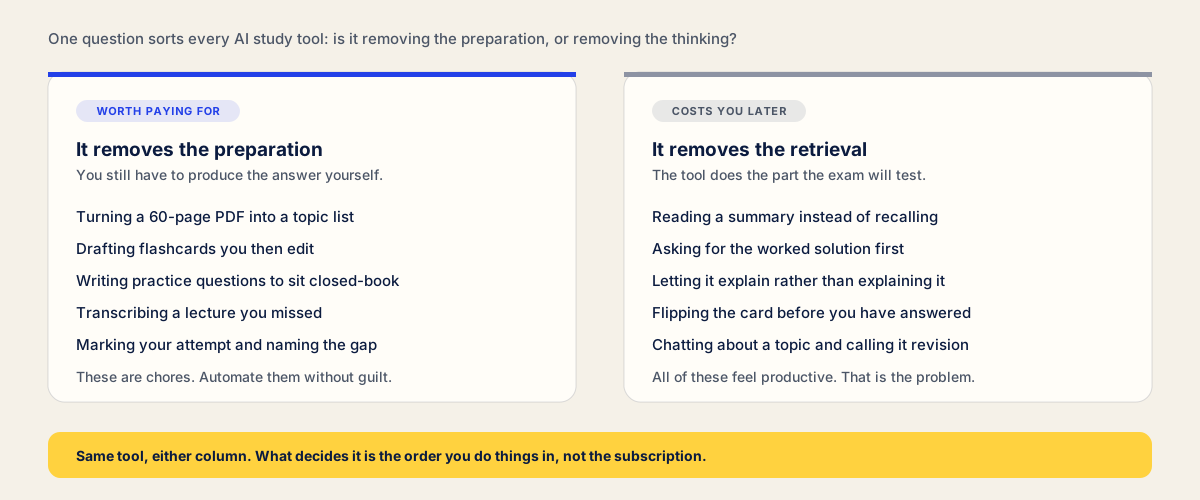
Ask one question of any AI study tool: is it removing the preparation, or is it removing the retrieval?
Removing preparation is pure gain. Nobody learned anything from typing out flashcards, transcribing a lecture, or working out which forty pages of a reading list matter. Automate all of it.
Removing retrieval is where it costs you, because active recall is the single best-evidenced thing you can do with study time, and it is what drives long-term retention. Reading an AI summary is not studying; it is rereading with fewer words. Asking for the worked solution is not practice. We have gone through the evidence for this in 7 secret methods for studying.
The awkward part is that the second column feels better than the first. It is smooth, fast and frictionless, and that fluency is exactly what fools you.
Do AI study tools help you learn faster? What the evidence shows
This is not speculation. In 2025, researchers from Wharton and Penn published a field experiment in PNAS covering nearly a thousand high school maths students across three year groups.
One group practised with GPT Base, an interface much like ChatGPT. A second used GPT Tutor, the same model with prompts designed to give hints and guide rather than hand over answers. The third group had only a textbook.
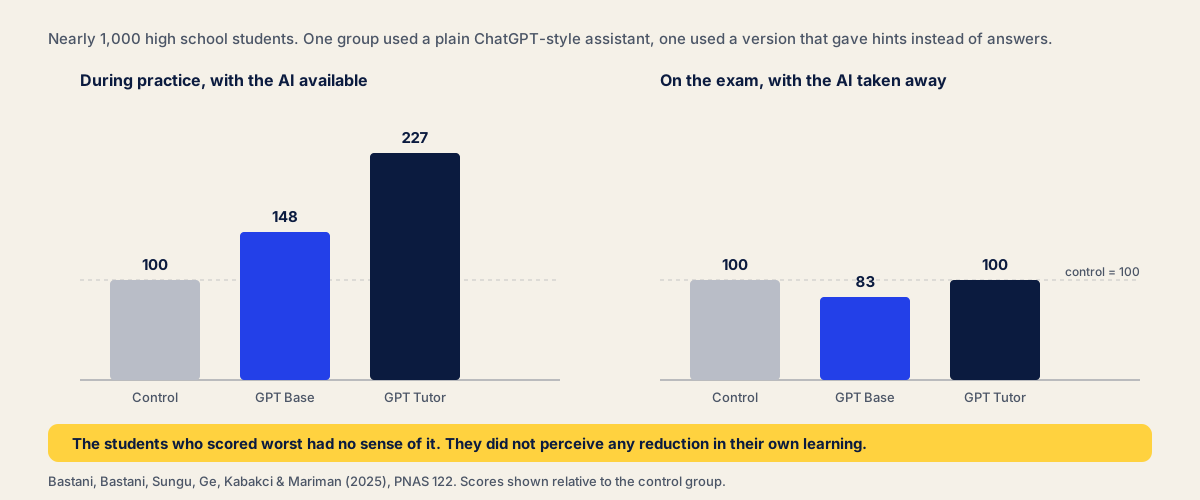
While the AI was available, both groups did better — GPT Base by 48%, GPT Tutor by 127%. Then the researchers took it away and ran an exam.
The GPT Base group scored 17% worse than students who had never used AI at all. The tutor group, which had been forced to work rather than copy, came out level with the control. Analysis of the chat logs showed why: the Base group used it as a crutch, asking for solutions and copying them.
Two things to take from this. The damage is not caused by AI, it is caused by getting answers. And students in the study did not perceive any reduction in their learning, which means you cannot rely on your own sense of how well it is going. That gap between how learning feels and how much of it happened is the single most useful idea in this whole area, and it is why learning styles quizzes survive decades of failed tests.
Attempt first, ask second. Any time you open a chatbot before you have tried the problem, you are running the arm of the experiment that lost.
How we picked the best AI tools for students in 2026
Three filters, and one thing we are not claiming.
- Does it produce questions, or only answers? Tools that generate flashcards and practice tests rank higher than tools that summarise beautifully.
- Is the free tier real? Several tools here need no card and no signup. Where a paid tier matters, we say what it buys.
- Does it take your own material? Generic content is worth little. What is on your exam is in your course materials, so the tool has to accept your lecture notes, not just a topic name.
What we have not done is run a controlled benchmark — no stopwatch tests, no card-quality scores across one identical document. Prices and limits were checked in September 2026 and they move fast, so verify on the vendor’s page before paying.
NotebookLM — the best free AI study tool right now
Google’s NotebookLM answers only from sources you upload, which removes most of the hallucination risk that makes general chatbots unsafe for revision. Upload lecture slides, a textbook chapter and your own notes, and every claim comes back with a citation you can click to the exact passage.
For studying specifically, it now generates flashcards, quizzes and mind maps from your sources, plus Audio Overviews that turn a reading into a two-host podcast for the commute. Upload your notes alongside the set reading and it will find the places they disagree, which is a genuinely useful way into complex topics.
It will also draw a mind map or a flowchart of how concepts connect, which helps when a module has too many moving parts to hold at once.
Why it ranks first: it is the only free tool here that reliably turns your material into questions rather than summaries. Price: free tier with 100 notebooks, 50 sources each, and daily caps on chats and audio; paid tiers exist only to lift those ceilings.
ChatGPT — a good tutor only if you stop it answering
The most common question about studying with AI is whether ChatGPT is any good for it. The PNAS study answers that precisely: as you would use it by default, no. Prompted properly, yes.
The fix is a system prompt you paste once. Something like: “You are tutoring me on this topic. Never give me the answer. Ask me a question, wait for my attempt, then tell me what I got wrong and ask again.” That converts it from GPT Base into something closer to GPT Tutor.
It is also the best AI tutor here for one specific job — you explain a concept to it in your own words and it tells you what you have misunderstood. That is the Feynman technique with a marker, and unlike a teacher it is available at midnight.
Price: capable free tier; Plus around $20/month.
Anki — the best study tool here, and it has no AI
Anki generates nothing. You make the cards, or import a shared deck. The interface looks like 2005 because it is from 2005.
It is still the most valuable tool on this list, because it does the one thing with the strongest evidence behind it: scheduling retrieval at widening intervals. Its algorithms are documented and every parameter is exposed, which is not true of the “adaptive learning” in most AI apps.
The sensible 2026 workflow is a hybrid — use AI tools like NotebookLM to generate a draft deck, edit it down, then review in Anki. Its progress tracking is plainer than the dashboards in AI-powered apps and considerably more honest.
Price: free on desktop, web and Android. The iOS app is a one-off $24.99.
RemNote — best all-in-one for notes and flashcards
RemNote’s idea is that your notes and your flashcards should be the same document. You write notes, mark a phrase, and it becomes a card scheduled by spaced repetition. Its AI will also generate cards from a PDF.
It suits people who want one place for everything and are willing to learn a system. If you already keep notes elsewhere, the switching cost is real.
Price: usable free plan; Pro around $8/month billed annually, with a higher AI tier.
Quizlet — the biggest library of ready-made flashcards
Quizlet’s advantage is other students. Hundreds of millions of existing sets mean someone in your course has probably already made the deck. Its AI features generate cards from uploads and, more recently, record lectures.
The catch is that community decks skew to definition-matching, and they match somebody else’s lecturer. Useful as a starting point, risky as your only source.
Price: free with limits; Plus around $7.99/month. Quizlet’s AI features and its study guides are mostly metered rather than absent on the free plan.
Perplexity — best for research you have to cite
Perplexity is a search engine that answers in prose with footnotes to real sources. For the research stage of an essay — finding out what exists, who disagrees, which paper is the original — it beats both Google and a plain chatbot.
Treat it as a way to find sources, not as a source. Follow the footnotes and read the paper; the summary is a signpost, not a citation.
Price: solid free tier; Pro around $20/month.
Otter.ai — best for recording a lecture
Otter records lectures and turns them into notes automatically, producing a searchable transcript and a summary afterwards. That is genuinely useful if you have an accented lecturer, a hearing difficulty, or you are studying in a second language.
One caution: a transcript is not revision. It is raw material that still has to be turned into questions, and it is very easy to finish a term with sixty transcripts and no recall.
Price: free tier with monthly transcription limits; paid plans lift them.
Wolfram Alpha — best AI tool for studying STEM
Wolfram Alpha computes rather than predicts, which means for maths and physics it is right in a way that language models are not. Enter an integral and you get the answer, and with a subscription, the steps.
Use it to check your work after you have attempted it. Using it before is the GPT Base arm of the experiment with better arithmetic.
Price: free for answers; step-by-step explanations for each answer are paid.
Khanmigo — best for filling gaps in foundations
Khan Academy’s Khanmigo is the closest thing here to the GPT Tutor condition by design: it is built to withhold answers and ask guiding questions instead, on top of Khan’s own curriculum.
If your problem is that a topic from two years ago never landed, this is better than a general-purpose AI chatbot, because the material is sequenced and the tutor will not simply solve it for you. For students who need to rebuild foundations rather than cram, it is the best option here and it is completely free for learners.
Price: free for learners in many regions through Khan Academy’s non-profit funding.
Turbo AI — fast flashcards from lectures and PDFs
Turbo AI is deliberately narrow: upload a PDF, a document, a YouTube video or an audio recording, and get flashcards and notes quickly. There is not much else to it, which is either the appeal or the limitation.
Worth a look if your bottleneck is purely the speed of turning a lecture into a deck.
Price: limited free tier; paid plan roughly $10/month. Like most tools of this shape, it offers a free allowance and then meters you.
PDF Summarizer — free triage for a stack of readings
Our tool, and a narrow one. The PDF summarizer takes a PDF and gives you the outline and key points, with no signup and no card, for files up to 50 MB. It reads the file page by page rather than truncating it, so a 300-page module handbook does not come back summarized from its first and last chapters.
We are putting it here rather than at the top because it belongs in the left-hand column of that first diagram and nowhere else. It is a triage tool: use it to find out which forty pages of a hundred deserve real attention, then close it and study those properly. If you read our summary instead of recalling the material, we have made your revision worse, not better.
The same triage logic runs on the formats a PDF tool cannot help with. Lecture slides go through the PowerPoint summarizer, a whiteboard photo or a page of borrowed handwritten notes through the image summarizer, set texts in EPUB through the book summarizer, and a pasted recording transcript through the text summarizer. All free, all the same rule: sorting, not studying.
And the caveat from our guide to summarizing a PDF holds: summaries fail quietly, dropping a qualifier or a date while the prose stays confident. Check anything you will write in an exam against the source.
Other AI study tools worth knowing about
A roundup that names eleven products is not the whole market. These come up often and are reasonable picks for narrower jobs.
- Mindgrasp and StudyFetch both pair document upload with an AI tutor chatbot — StudyFetch’s is called Spark.E. Closest in spirit to an all-in-one, priced accordingly.
- StudyX, Anara and Jenni AI lean towards research and academic writing. Anara searches PubMed, arXiv and JSTOR, which general chatbots do not.
- Notion with its AI add-on is an organiser rather than a study tool. Good for a semester plan and note-taking, weak for retrieval.
- NaturalReader reads documents aloud in over 50 languages, which matters if English is not your first language or you revise while commuting.
- BrightPal and Google Gemini both create flashcards and quizzes from uploads; Gemini’s student plans also generate study guides from your own course material.
One thing nobody in this category advertises: privacy. You are uploading lecture slides, and sometimes copyrighted textbooks, to a third-party database. Check whether your files train the vendor’s models, whether your college has a policy, and prefer tools that let you delete a source. It is not paranoia; it is the same care you would take with any technology that keeps a copy.
Free AI study tools for students: everything you need to study smarter
You can assemble a complete study system in 2026 without a subscription:
- 1
NotebookLM for turning your sources into questions
Free tier covers 100 notebooks and 50 sources each, including flashcards, quizzes and Audio Overviews.
- 2
Anki for the review schedule
Free on desktop, web and Android. The only cost is the iOS app.
- 3
ChatGPT's free tier as a tutor, prompted to withhold answers
Enough capability for explaining back and being corrected.
- 4
A free summarizer for triage
Ours needs no signup; use it to decide what to read closely.
The best free AI study tools are not the stripped-down versions of paid apps. They are NotebookLM and Anki, both of which are better than most things you could buy, and both are free for students without a discount code.
If money is tight, spend it on nothing until you have used that stack for a month. Creating study materials is the cheap part now; the expensive part is still the hour you spend answering them.
How to build a study system: what to use AI for in every study session
Tools do not make a system. This is the order that works, and every AI step happens before the retrieval, never instead of it.
- 1
Triage
Summarize the reading list to find what actually matters. Ten minutes, not an evening.
- 2
Generate
Turn the material that matters into questions — NotebookLM, or an AI flashcard tool.
- 3
Edit
Delete the junk cards, fix the vague ones, add what your lecturer stressed. Two minutes well spent.
- 4
Retrieve
Close everything and answer. This is the only step that is actually studying.
- 5
Space it
Anki, or a 2-3-5-7 schedule. Reviewing tomorrow and in a week beats reviewing twice today.
- 6
Check
Mark honestly, name the gap, feed it back into step two.
If you want the technique that fits step four, it is the blurting method — closing the book and writing out everything you remember. And if the constraint is the length of the day rather than the tools in it, how to study for long hours sets out how many of these cycles a day can realistically hold.
Mistakes that stop AI tools from helping you learn
Asking before attempting. The one behaviour the PNAS study isolated as harmful. Try it first, even badly.
Treating generation as studying. Producing 200 flashcards feels enormously productive and teaches you nothing until you answer them. Nothing reaches long-term memory because you made it.
Trusting the output on detail. Language models drop qualifiers and invent tidy numbers. Anything you will be marked on gets checked against the source.
Collecting tools instead of using one. Four apps with a half-finished deck in each is worse than one app you open daily. This is the most common failure among college students who read articles like this one.
Letting it explain instead of explaining it. Reverse the direction. You explain, it corrects.
Reading the summary the night before. That is the fluency trap in its purest form — familiar material, no ability to produce it.
Frequently asked questions
What is the best AI study tool in 2026?
For most students, NotebookLM, because it is free, it answers only from sources you upload, and it generates flashcards and quizzes from your own material rather than generic content. If you already have cards and want the best review scheduling, Anki is still better, despite having no AI in it at all. The strongest setup is both.
Is ChatGPT good for studying?
Only if you stop it giving you answers. In a PNAS field experiment with nearly 1,000 students, those who practised with a standard ChatGPT-style assistant scored 17% worse on the exam than students who never used it, because they asked for solutions and copied them. A version prompted to give hints instead of answers removed the harm completely. Same model, different instructions.
Are AI study tools free?
Many of the best ones are. NotebookLM has a permanently free tier with 100 notebooks and 50 sources each. Anki is free on desktop, web and Android. ChatGPT and Perplexity have usable free tiers, and our PDF summarizer needs no signup. Paid plans mostly buy higher limits rather than better learning.
Can AI study tools actually improve my grades?
They improve grades when they shorten preparation and leave the retrieval to you, and they lower grades when they do the retrieval for you. The evidence is unusually direct on this: gains during AI-assisted practice disappeared on the exam for students who used AI as a crutch. Use it to build questions, not to answer them.
What study materials can AI tools process?
Most will take PDFs, Word documents, slides and pasted text. Many now handle audio, so you can upload a lecture recording, and several accept photos of handwritten notes or YouTube links. NotebookLM and Otter both handle audio well; check file size limits, since long recordings and large scanned PDFs are where free tiers usually stop.
Can I use several AI study tools together?
Yes, and the common setup is deliberately split: one tool to generate material from your sources, another to schedule the review. Generating a draft deck with an AI tool and then reviewing it in Anki is the most popular workflow among heavy users, because it pairs the fastest preparation with the best-documented scheduling.
The short version
The best AI tool for studying in 2026 is whichever one gets you to a closed book fastest. By that measure NotebookLM leads on the free tier, Anki still wins the part that decides your grade, and ChatGPT is either excellent or actively harmful depending on a prompt you can write in one sentence.
The uncomfortable finding underneath all of this is that students could not feel the difference. The group that ended up 17% worse thought it was going fine. So do not evaluate your tools on how smooth the session felt — evaluate them on what you can produce a week later with everything closed. That number is not flattering, and it is the only one your exam agrees with.